After Phantom Blade Zero launched on PC, plenty of players noticed the same visual quirk: environment objects go soft and blocky the moment the camera gets close, as if a layer of frosted glass had been dropped over them. That is not a GPU or driver problem. The game ships a large share of its environment textures at 1024×1024 or lower, and the low resolution shows as soon as the camera closes in. Modder DeathTheReaper9 released "PBZ - 4K Texture Remaster Project" on November 8 to target exactly that set: it redraws 553 colour textures at four times their resolution, upgrades 953 normal and mask maps alongside them, and ships as three archives totalling 12.3 GB.
This is a community mod, not an official patch. As of this writing it sits at version 1 on Nexus Mods with 1,840 unique downloads, 6,458 total downloads and 33 endorsements. Everything below follows the author's own description on the Nexus Mods page: what the pack changes, how to install it, and the one thing most people trip over — after installing, the 4K detail still does not show up by default, because the game picks a texture's resolution by how much of the screen it covers, and you need to edit one config file to change that. (If you are more interested in frame rates than texture detail, the numbers live in our PC benchmark breakdown.)
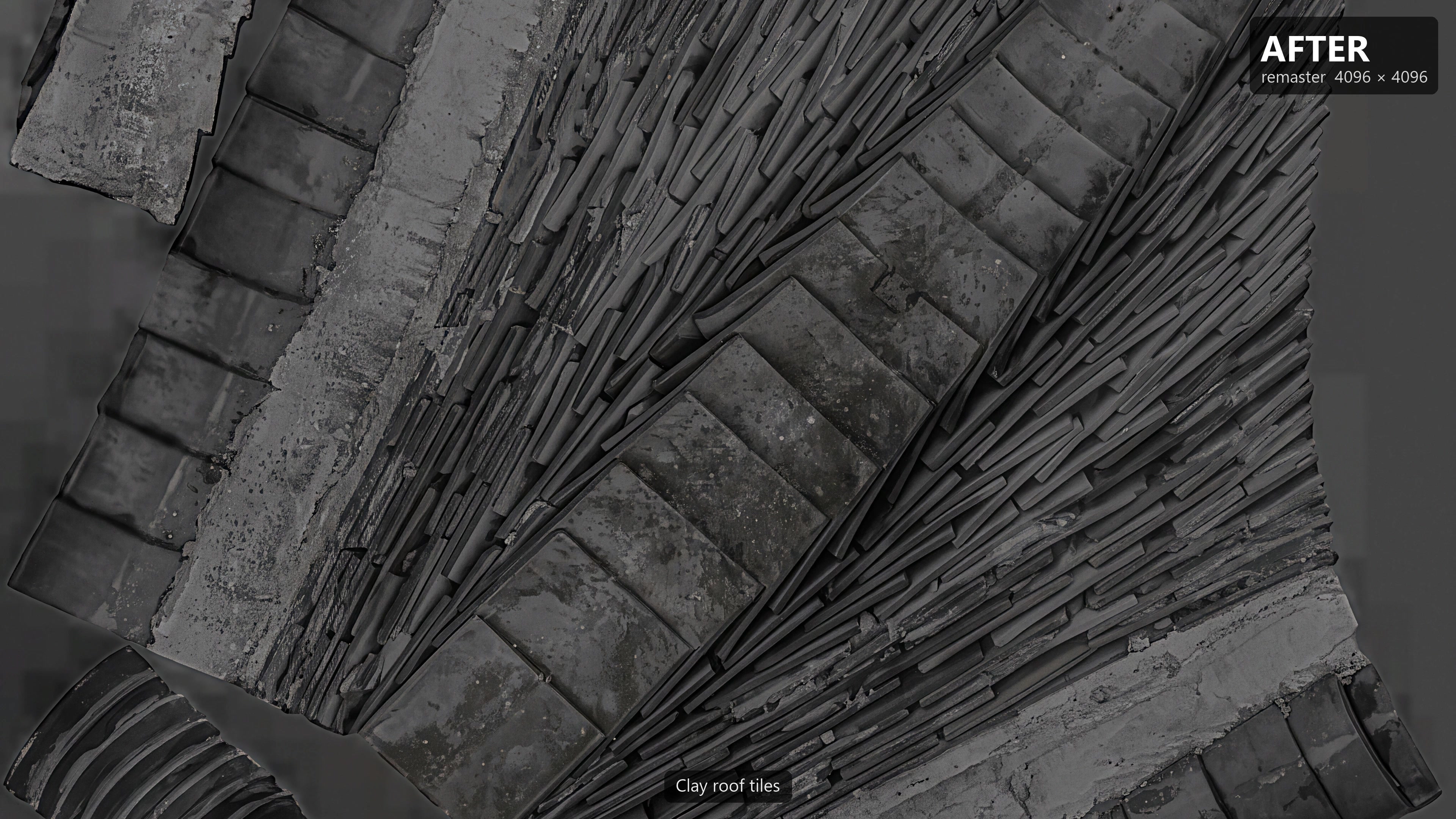
What it changes: 553 colour textures plus 953 normal and mask maps
The core of the pack is 553 colour textures, all redrawn at four times their original resolution. Of those, 431 move up to 4096×4096 — standard 4K — while 86 go to 2048×2048, and the rest scale up by their own 4x factor, so a texture that shipped at 512×512 becomes 2048×2048, and so on down the line. The author is deliberately narrow about what qualifies: only textures that shipped at 1024×1024 or lower are touched, because those are the ones that visibly break down under magnification.
Alongside the colour work, 953 normal and mask maps are upscaled to the same size. Normal maps drive how a surface catches light, along with its bumps and direction; mask maps control how materials blend and where their detail lives. If those two were left at the old resolution while the colour maps went up, the new colour would not line up with the lighting, and the result would look flat or mismatched rather than sharper.
The coverage is all environment and props, and it is worth reading the list closely to know what to expect. It includes tree bark, shrubs and ground plants; household items such as jars, lanterns, candles, bowls, crates and ropes; building parts like fences, pillars, doors, windows, beams and roof tiles; plus rocks and decorative ground decals. The whole set is the kind of thing that looks soft up close — not characters and not the interface. In practice, that means the improvement lands exactly where you spend most of your time looking from close range: the walls and props you brush past, the ground underfoot, and the surfaces the camera lingers on during exploration.
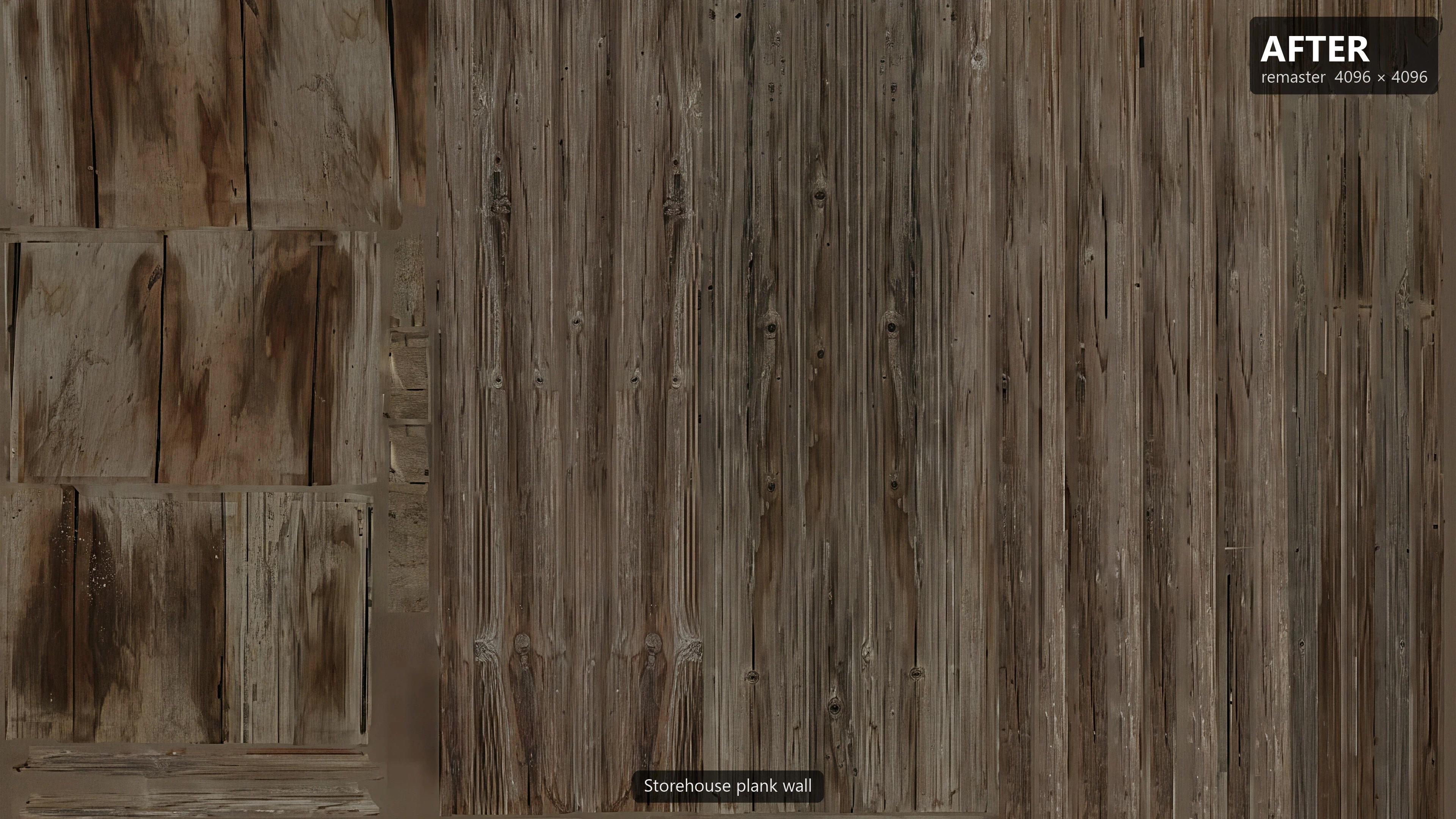
What it leaves alone: faces, hair, skin, UI, and textures already big enough
A few categories are untouched. Faces, hair, skin textures and the user interface all stay as they are, because those assets already ship at 2048×2048 or higher and further upscaling would bring very little visible gain. Textures that were already packed at 2048×2048 or above are also skipped for the same reason.
Put another way, this mod does not change how any character looks, and it does not touch a single interface element. It is scoped strictly to the low-resolution environment and prop textures, so installing it will not make your character look sharper — it will make stones, roof tiles, planks and leaves look clearer. Keeping the scope narrow is also why the pack can stay focused and consistent: the author is only redrawing the surfaces that actually benefit.
How it was made: AI redraws, colour restoration, and a double vision check
These textures were not painted by hand one at a time, and they were not produced by a simple upscaling algorithm either. The author ran Google's Nano Banana 2.1 image model on Vertex AI, feeding it each of the game's own textures as a base and asking the model to redraw the image at 4K. After the redraw, the game's original colour values were restored, so the model could not quietly shift the palette away from what the art team shipped.
The interesting part is the quality control. To keep the layout, shapes and colours faithful, every redraw was compared against the original at full size by two independent AI vision models. When the two disagreed, a third review settled the disagreement. The process produced a concrete ledger of outcomes: 19 textures were kept as they were because the redraw was not better, and 13 more had a small flaw — a soft edge, a ring artifact or a visible tiling seam — which was fixed by blending the original texture back over just that spot. In other words, the author did not blindly accept whatever the model returned; anything that looked worse or slightly off was either reverted or patched.
The normal maps were upscaled with the 4x-Normal-RG0-BC7 method and the mask maps with 4x-UltraSharpV2, both of which preserve the broad shapes of the originals. Nexus Mods also tags the mod as "AI-Generated Content", which is accurate — it was produced with an image generation model rather than by hand.
How to install: three archives, 12.3 GB, extracted into Paks
The download is three zip files, 12.3 GB combined and about 19.7 GB once extracted. The three parts are independent: installing all three gives the full remaster, while leaving one out simply keeps that part's textures vanilla — nothing errors out, and you can add a missing part later without reinstalling the others.
There are two ways to install. With a mod manager such as Vortex, close the game and drop the three zips onto it. Manually, close the game, open the game folder at PBZ\ProjectPBZ\Content\Paks\ (on Steam, right-click the game, Manage, Browse local files), and extract each zip there — each zip contains a ~mods folder, so the files end up in Paks\~mods\. Then start the game.
Uninstalling is the reverse: delete every PBZ_Textures_* file from Paks\~mods\. One detail worth remembering is that each batch is two pak files — the colour map PBZ_Textures_nbNN_P and its normal and mask maps PBZ_Textures_nbNNc_P — and the pair should be kept together; keeping one without the other will cause problems. The mod was built for game build 26266538 (dated October 28, 2026), so if a future game update makes the textures look wrong, delete the files and wait for the author to update.
Why it still looks soft after installing: the game scales texture detail by screen coverage
This is the section that explains the most common post-install confusion. Even with all three parts installed, a lot of people open the game and wonder whether anything changed.
The reason is that the game does not simply use the highest texture resolution available. Textures are stored as a chain of progressively smaller versions, and the renderer picks which version to sample based on how much of the screen that texture covers at the moment. From the normal third-person camera, with a fair amount of distance between the lens and the ground or walls, the game mostly displays the 2048 level of this pack. The full 4096 only kicks in when the camera is very close. Sampling from a lower level at distance is not a bug — it saves memory bandwidth and keeps distant fine detail from shimmering — but it means the mod's headline 4K resolution does not automatically reach the screen during normal play.
To force the 4K detail at normal distance, two steps are needed. First, set Texture Quality to the highest setting in-game. Second, open File Explorer, paste %LOCALAPPDATA%\ProjectPBZ\Saved\Config\Windows into the address bar, and create a text file named Engine.ini in that folder with this content:
[SystemSettings]
r.ViewTextureMipBias.Offset=-2
r.ViewTextureMipBias.Min=-2
Save it, right-click the file, choose Properties, tick Read-only, and confirm. The author recommends -1; -2 is sharper, but fine detail can shimmer in motion, which DLSS mostly resolves. To undo, delete the file. If you already run the author's Ultra+ mod, it handles this ini setting for you, so you can skip these two steps. Most reports of "no visible difference" after installing come down to skipping exactly this part: the files are in place, but the engine is still sampling the lower levels.
VRAM and compatibility: memory use stays about the same
One common worry is whether 4K textures will blow out the VRAM budget. The author's position is that memory use stays about the same with or without the mod, because the game reserves a fixed texture pool — changing the resolution of the textures still draws from that same pool, so there is no need to buy a new card for this mod specifically. The game's texture streaming still respects your in-game settings, so low settings will keep streaming at a low resolution regardless of how the texture files themselves were redrawn.
On compatibility, the pack works alongside the author's other pak mods and most gameplay pak mods. A mod that replaces the same textures will conflict, though, so you have to pick one or the other. The same author also maintains several other Phantom Blade Zero mods: PBZ Tuner AIO for broad parameter tweaking, a parry and dodge window adjustment, an enemy health multiplier, and a resource drop multiplier.
For PC players who care about close-up material detail and have VRAM to spare, this pack is worth a try. It does not change characters, the UI, or performance settings — but do not skip the Engine.ini step, or you will barely notice a difference.